
Gruvbox配色主题补完计划
前言
Gruvbox是一个柔和复古的暖色调主题,对比度也很高,长时间盯着也不会刺眼难受,这也是我最喜欢的配色主题,所以我的整个linux基本都是gruvbox的配色主题,包括终端st,窗口管理器dwm和其他软件,所以本篇博文我会分享我linux的gruvbox的配色主题文件,你也可以看看gruvbox的色调(暗):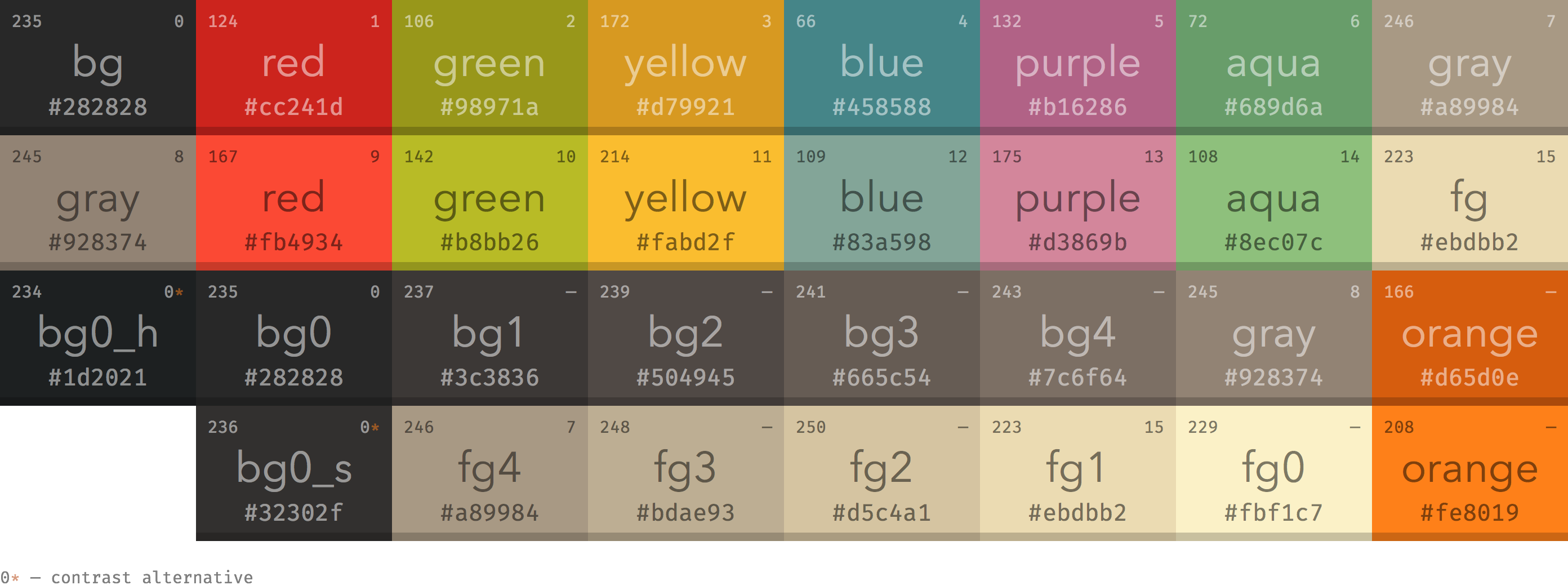
配置主题
如果你要自定义图标或主题,那么使用一个gtk编辑器来自由切换主题就十分方便,我们可以使用nwg-look来管理我们的图标和主题了,这个软件可以使用包管理来安装使用,我已arch为例:sudo pacman -S nwg-look
随便提一句nwg-look是nwg-shell的一部分,nwg-shell 项目旨在为sway Wayland 合成器创建一个基于 GTK3 的统一用户界面。为了给用户提供尽可能多的选择,安装好nwg-look后就可以开始下载主题文件那些来
gtk主题
gtk是一个gui框架,很多应用都是使用gtk框架,所以所以gtk主题就可以让许多软件变成gruvbox配色,我们可以在opendesktop里下载压缩包或者如果你使用的是arch就可以使用aur仓库里的包来安装了:yay -S gruvbox-gtk-theme-git
如果你是手动下载那你需要在家目录下手动创建一个.themes的文件夹
mkdir .themes
然后在把下载好的压缩包解压放入到里面,如果要所有用户生效移动至全局目录/usr/share/themes下然后打开nwg-look就可以看到添加的主题了,相比之下我更推荐使用aur的方案
qt主题
大部分的软件界面都是使用qt和gtk框架,导致使用gtk的是我们配置好的gtk主题,而使用qt的就是”眼前一亮”了,十分影响体验,所以我们也需要找一个和gtk主题差不多的qt主题来让我们使用起来不那么割裂,这一部分参考统一 Linux GUI 框架主题和外观
首先我们要先下载管理和控制qt样式的软件,也就是qt6ct还有Kvantum,使用你的包管理器安装:sudo pacman -S qt6ct kvantum
打开qt6ct后你会发现上面有一个警告,提示你没有让qt程序从qt6ct读取配置,我们需要设置环境变量,使用你的文本编辑器打开/etc/environment,在里面添加:QT_QPA_PLATFORMTHEME=qt6ct
然后重启一下就可以了,在qt6ct你可以设置字体和图标等,关于主题就需要用到另一个软件Kvantum了,你可以在Kvantum里安装一些主题,包括gruvbox主题,我们先下载主题,访问下面的仓库:
https://github.com/sachnr/gruvbox-kvantum-themes
在发布页面下载压缩包后解压,或者直接git克隆下来后,打开Kvantum,现在安装/更新主题那一栏目,点击选择一个Kvantum的主题目录,现在你解压完成的文件夹,点击安装此主题就可以了,然后点击变更/删除主题那一栏目,在选择一个主题的列表现在你刚安装好的就可以了,然后点击应用此主题后退出,接着再打开qt6ct,在外观那里的风格选择Kvantum后点击下面的应用和确认,这样你打开qt应用就是gruvbox主题了
图标主题
在默认的软件图标是软件的默认图标,可能会和gruvbox主题格格不入,所以可以借助图标主题来增加美观性,如果你是arch你可以使用aur仓库的包:yay -S gruvbox-plus-icon-theme-git
也可以在项目发布页面下载.zip压缩包后解压放在家目录的.icons文件夹,如果要所有用户生效移动至全局目录/usr/share/icons下然后打开nwg-look就可以看到添加的主题了,相比之下我更推荐使用aur的方案
鼠标主题
默认的鼠标主题可能会和gruvbox主题格格不入,所以可以借助鼠标主题来增加美观性,这里使用Moga Neon鼠标主题,在下载网站下载文件名有sandy的zip压缩包解压到家目录的.icons文件夹,如果要所有用户生效移动至全局目录/usr/share/icons下然后打开nwg-look就可以看到添加的主题了,不过在nwg-look下选择应用是没有办法应用的,我们还需要其他配置,这里已dwm(x11)为例,在家目录新建.Xresources文件,在文件添加
1 | Xcursor.theme: Moga-Neon-Sandy |
上面分别是鼠标主题名称和鼠标大小,然后我们还要在.xinitrc加载,在.xinitrc添加:xrdb -merge ~/.Xresources
其他细节查看: https://wiki.archlinux.org/title/Cursor_themes
dwm状态栏配色
打开config.h配置文件:
1 | /* 状态栏配色(Gruvbox) */ |
不过相对于修改config.h文件,我还是推荐修改config.def.h在删除config.h文件:rm -rf config.h
因为如果不删除config.h文件,编译安装后就还是之前的配置,所以需要删除后在编译安装:sudo make clean install
Fcitx5主题
默认的fcitx5主题是白色的,十分刺眼,所以使用主题就可以来增加美观性,主题使用fcitx5-gruvbox-dark-theme,如果你是arch可以使用aur的包:yay -S fcitx5-gruvbox-dark-theme-git
或者也可以手动安装,首先使用git克隆仓库:git clone https://github.com/zpyg/fcitx5-gruvbox-dark-theme ~/.local/share/fcitx5/themes/gruvbox-dark --depth=1
- 设置主题颜色(可选,默认为aqua)
1 | cd ~/.local/share/fcitx5/themes/gruvbox-dark |
(注:如果说aur安装的不需要这一部)
然后在.config/fcitx5/conf/classicui.conf文件下设置主题:
1 | ### 垂直候选列表 |
然后在重新启动就可以了
st(终端模拟器)
打开config.h配置文件:
1 | /* Terminal colors (16 first used in escape sequence) */ |
不过相对于修改config.h文件,我还是推荐修改config.def.h在删除config.h文件:rm -rf config.h
因为如果不删除config.h文件,编译安装后就还是之前的配置,所以需要删除后在编译安装:sudo make clean install
Zathura
打开.config/zathura/zathurarc写入以下内容,gruvbox配色配置使用 https://github.com/eastack/zathura-gruvbox
1 | set notification-error-bg "rgba(40,40,40,1)" # bg |
Telegram
gruvbox 风格的 Telegram 主题
使用方法很简单,只需打开:
https://t.me/addtheme/gruvboxTelegram
跳转到应用后点击应用就可以了
qbittorrent
在默认的qbittorrent 是只有白色的,在晚上就十分刺眼,我们可以使用配色文件来效果
仓库地址:
https://github.com/MahdiMirzadeh/qbittorrent
- 在 qBittorrent 中:
- 转到“工具”→“选项”→“行为”→“界面”
- 在“界面主题”下,点击“…”并选择下载的
.qbtheme文件 - 点击确定并重启 qBittorrent
nvim
仓库地址:
https://github.com/ellisonleao/gruvbox.nvim
如果你的nvim插件管理器是packeruse { "ellisonleao/gruvbox.nvim" }
如果是lazy{ "ellisonleao/gruvbox.nvim" },
然后在init.lua添加:
1 | --外观 |
浏览网页
在浏览器流量网页的时候总是会有几个网站没有暗色模式,让你忽然”眼前一亮”,尤其是国内的网页,很多都是只有亮色模式,这里就可以使用一个浏览器插件:Dark Reader
https://darkreader.org/